
For building product manufacturers, getting written into a specification is a real milestone. It means an architect or engineer knows your brand and trusts it enough to name it. But a spec mention is where the important questions start. Which of your products was called out? Which model? How many? And did it carry through into the drawings, or did a competitor’s product end up there instead?
Those answers usually exist in the project’s plan schedules.
What is a plan schedule?
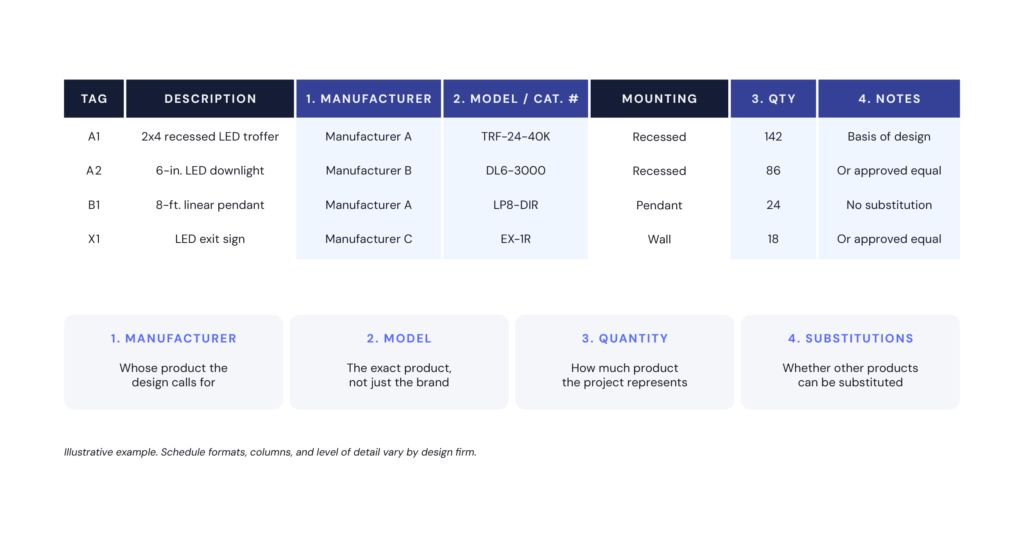
A plan schedule is a table in a project’s construction drawings that lists the specific products planned for the building. It often includes the manufacturer, model number, type, and quantity for each item. Common examples are lighting fixture schedules, plumbing fixture schedules, mechanical equipment schedules, and door hardware schedules. Each item is typically tied to a tag or location on the plans.
ANATOMY OF A PLAN SCHEDULE
What’s the difference between a specification and a plan schedule?
The specification sets the requirements. The plan schedule shows the specific products planned to meet them.
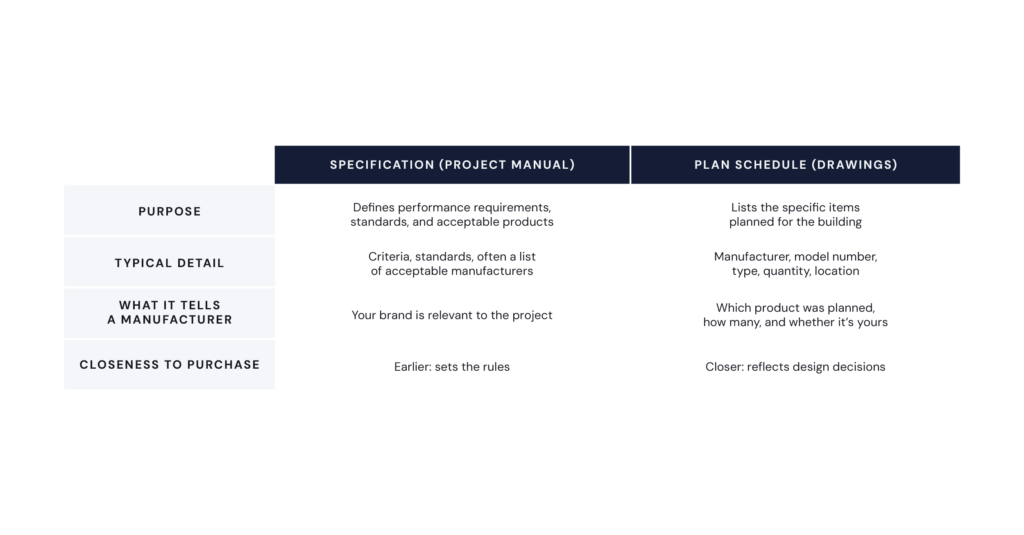
That’s why the schedule matters so much to manufacturers. It’s where you can see whether your product is the one planned, whether a competitor’s product is there instead, and how much product the project represents.
Why has plan schedule data been so hard to use?
Plan schedule data has been hard to use because extracting it is almost entirely manual, and every design firm formats schedules differently.
Schedules live inside drawing sets that can run hundreds of pages. Column names, abbreviations, and levels of detail vary from firm to firm and project to project. Finding the relevant schedules on one project takes a skilled reviewer real time. Doing it consistently across a territory, or comparing results across hundreds of projects, has been out of reach for most sales and marketing teams. Two reviewers can read the same schedule and reach different conclusions.
The scale of that inconsistency is significant. In building Schedule Intelligence, Dodge Construction Network processed 3.1 million raw schedule columns from project documents. It standardized them into 13 normalized attributes, including manufacturer, model, quantity, basis-of-design manufacturer and model (where the documents call it out), and CSI classification. More than 300 additional enriched attributes capture deeper product detail across 27+ product categories at launch.
Already a SpecShare customer? Contact your Account Manager to see Schedule Intelligence in action on one of your active projects.
What can manufacturers learn from plan schedule data?
Structured schedule data helps building product manufacturers answer three questions: where their products are specified and in what volume, which manufacturers are planned on the schedule, and how competitive position is shifting across their market.
1. Opportunity sizing: Where are my products specified, and in what volume?
Schedule quantities let manufacturers rank opportunities by the amount of product a project represents, not just its overall value. A large project with a handful of relevant line items may matter less than a mid-size project calling for hundreds of units in your category. Where quantities are available, sales teams can focus on the projects with the greatest order potential.
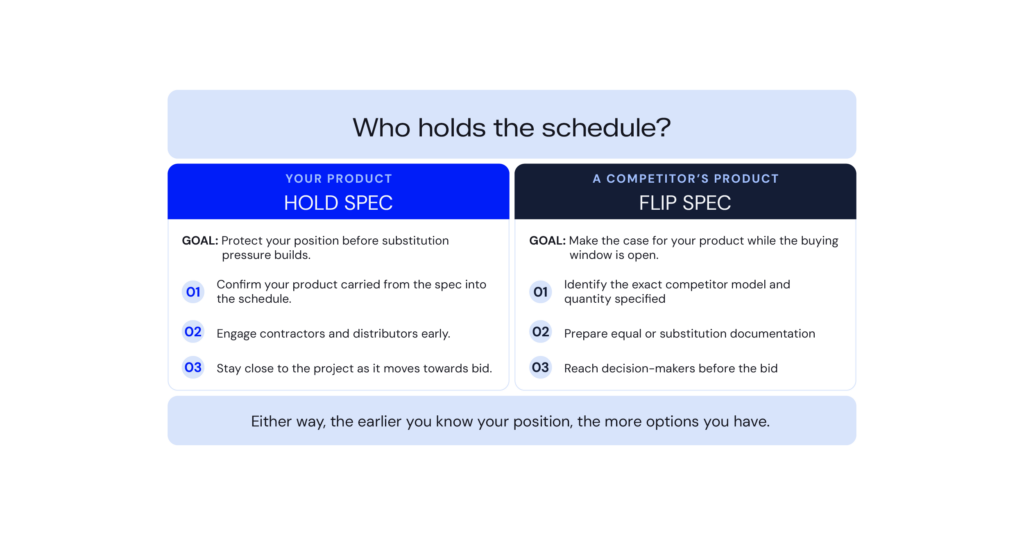
2. Competitive awareness: Who holds the schedule?
The manufacturers and models listed on a schedule show which products the designer planned around. Some schedules explicitly name a basis of design; more often, a single listed manufacturer signals the designer’s intent. Either way, knowing where you stand shapes your sales strategy.
- Hold spec: Your product is the one listed on the schedule. The goal is to protect that position by engaging contractors and distributors early, before substitution pressure builds.
- Flip spec: A competitor’s product is the one listed on the schedule. The goal is to make the case for your product as an equal or substitute while the buying window is still open.
In both cases, the earlier you know your position, the more options you have.
3. Trend analysis: What’s changing across my market?
Aggregated across many projects, schedule data shows market patterns that individual projects can’t. It can show which models are called out most often in a region or project type, where competitors are gaining or losing ground, and which product categories are appearing more frequently. These patterns inform territory planning, product positioning, and marketing investment, not just individual deals.
How should manufacturers start using plan schedule data?
Start with projects you already track, confirm your schedule position, and then build from there:
- Check projects you already know. Take active projects where your brand appears in the spec and see whether it carried into the schedule. That quickly shows the gap between being mentioned and being planned.
- Identify whose product is scheduled on every priority project. Sort your pipeline into hold-spec and flip-spec positions so each gets the right sales motion.
- Rank by quantity, not just project value. Where quantities are available, use them to re-prioritize your target list.
- Give reps schedule detail before first contact. A conversation that opens with “I see 140 fixtures of this type on the lighting schedule” lands differently than a cold introduction.
- Review competitive position on a regular cadence. A monthly or quarterly look at where competitors appear on schedules in your territory turns one-off wins and losses into patterns you can act on.
How does Schedule Intelligence work?
Schedule Intelligence is an AI-powered report in Dodge One. It automatically extracts product-level data from project plan schedules, so manufacturers can see what was specified without reading the plans.
Powered by DocAI, Dodge’s proprietary AI extraction engine, Schedule Intelligence reads plan schedules and pulls out the manufacturer, model, material, type, and quantity (when available). It organizes that data into structured, searchable records that users can filter by discipline, compare across thousands of projects, and export for deeper analysis. Schedule Intelligence is licensed by building discipline, so teams can focus on the schedules that matter to their product lines.
For manufacturers already using Spec Share and SpecAlerts, Schedule Intelligence is the natural next step. SpecAlerts tells you your brand was written in. Schedule Intelligence tells you exactly what was specified.
Frequently asked questions
What information does a plan schedule include?
A plan schedule typically lists each specified item’s manufacturer, model number, type or equipment type, and quantity, tied to a tag or location in the drawings. The level of detail varies by design firm and discipline.
What does “basis of design” mean in construction?
Basis of design (BOD) is the specific product a designer uses as the reference standard for a project requirement. Other products may be allowed as equals or substitutes, but the BOD product sets the benchmark, which gives its manufacturer an advantage.
What’s the difference between hold spec and flip spec?
Hold spec means protecting your product’s position when it’s already the product listed on the schedule. Flip spec means working to get your product accepted in place of a competitor’s specified product.
How is Schedule Intelligence different from SpecAlerts?
SpecAlerts identifies projects where your brand appears in the specification. Schedule Intelligence goes a level deeper, showing the specific manufacturer, model, material, and quantity called out in the project’s plan schedules.
Which building disciplines does Schedule Intelligence cover?
Schedule Intelligence is licensed across seven disciplines: architectural, mechanical, electrical, plumbing, structural, civil, and landscape. Extracted data is deepest in architectural, mechanical, electrical, and plumbing schedules at launch.